Dell vs HP Laptops: Which Is Better in 2026?
- Electronics Technology
 Neelam Rawat
- 0
- 51 minutes read
The Dell vs HP laptops debate has been running for years, but in 2026, the answer depends heavily on how you actually use your machine. Choosing between a Dell and an HP was once a straightforward matter of comparing screen brightness or hinge sturdiness. Today, the stakes have changed. We are in the age of the Copilot+ PC, where the brain of your laptop is no longer just a CPU – it is a sophisticated AI NPU designed to handle everything from live translation to local generative tasks without touching the cloud.
Both companies have also recently gone through significant identity refreshes. HP has largely retired legacy names like Pavilion and Spectre in favour of the HP OmniBook family. Dell, after a brief and confusing attempt to rename everything Dell Pro, has returned to its roots by doubling down on the iconic XPS and Latitude brands.
So whether you are hunting for the best budget laptop, trying to figure out Dell vs HP laptops which is better for students or professionals, or just want to know which brand holds up better over three years of daily use, this guide covers it all. Every major segment, every key use case, and the after-sales reality that most review sites skip entirely.
Dell vs HP Laptops (2026 Comparison)
| Category | Winner |
| Build Quality | Dell |
| Display Quality | HP |
| Battery Life | HP |
| Business Use | Dell |
| Budget Value | HP |
| Premium Performance | Dell |
Dell is better for durability and business reliability, while HP wins on display quality, design, and battery life.
Dell vs HP Which Is Better: What Each Brand Actually Stands For in 2026
Walk into any electronics store, and you will still hear the same pitch: Dell is for professionals, HP is for everyone else. That was mostly true five years ago. Today it is more nuanced — and frankly more interesting.
Dell has always led in build quality and durability. The Latitude and XPS lines feel engineered rather than assembled — tight hinges, minimal chassis flex, keyboards that hold up over years of heavy use. Dell also runs one of the most dependable driver update cycles in the business, which sounds boring until a Windows update randomly breaks your Wi-Fi the morning of a big meeting.
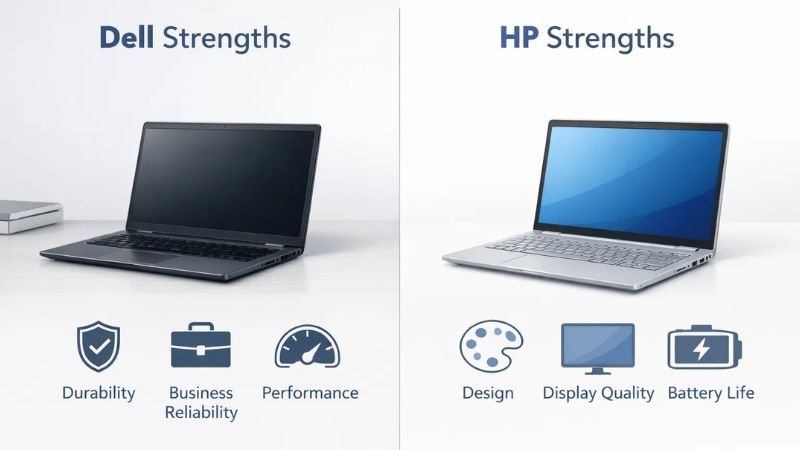
HP takes more creative risks. The Spectre x360 looks like jewellery compared to most Windows laptops. The OmniBook Ultra is genuinely slim without feeling fragile. HP has historically offered better displays at mid-range prices, though consistency across the lineup has been a weak point — a great HP flagship and a disappointing HP budget model can feel like they came from different companies. That gap has narrowed meaningfully in 2026, but it has not closed entirely.
Dell vs HP laptops, both brands now ship Intel Core Ultra processors with AI NPU performance built in. NPU performance measured in TOPS – tera operations per second – is now a real purchasing spec rather than marketing noise. Both Dell and HP clear the 40+ TOPS threshold on their flagship lines for full Copilot+ PC features. And Snapdragon X Elite laptops from both camps deliver battery life that genuinely competes with the MacBook Air on real-world workloads.
| Feature | Dell | HP |
| Known For | Reliability, build, support | Design, display, value |
| AI Laptops (Copilot+) | XPS, Inspiron Plus, Latitude | OmniBook, Spectre, EliteBook |
| Best Budget Pick | Inspiron 15 3000 | HP Pavilion 15 |
| Best for Business | Latitude series | EliteBook series |
| Premium Flagship | XPS 15 / XPS 16 | Spectre x360 / OmniBook Ultra |
| After-Sales Support | ProSupport (best in class) | Care Pack (solid, improving) |
| Battery Life (flagship) | Up to 18 hours | Up to 17 hours |
| On-site Warranty | Available from mid-tier | Business lines only |
Dell Inspiron vs HP Pavilion: Best Budget Laptop Face-Off
The Inspiron and Pavilion are the volume sellers. These are dependable laptops at prices that do not require a loan. In 2026, Dell Inspiron vs HP Pavilion laptops have received meaningful upgrades, but they still take noticeably different approaches to what a value-for-money laptop should prioritise.
What the Dell Inspiron Gets Right
The 2026 Inspiron 15 mid-tier configurations now ship with Intel Core Ultra 5, which means AI-powered laptop features like Windows Studio Effects and live captions run on the chip’s NPU rather than draining battery through the CPU. RAM and storage options have improved significantly — 16GB DDR5 with a 512GB NVMe SSD is now standard at prices that would have bought you 8GB and a spinning hard drive two years ago.
Build quality and durability are where Dell earns its reputation, even at this price. The chassis is plastic but dense and well-finished — no creaking, no lid flex that makes you nervous during a video call. Battery life sits comfortably at 9 to 11 hours of real use. Processor benchmark scores on the Core Ultra 5 put it comfortably ahead of previous Inspiron generations on both single-core speed and AI task handling.
After-sales support is the other underrated advantage. Dell’s service centre network in India is extensive. If something goes wrong – a dead key, a charging port issue – getting it sorted does not become a month-long exercise.
What the HP Pavilion Gets Right
The Pavilion trades some of Dell’s durability focus for a noticeably better keyboard and a sharper display. For anyone typing four or five hours a day, that keyboard difference is something you feel within the first week – the travel and feedback are clearly a step above what you get on the Inspiron at the same price. The display quality comparison also goes HP’s way – better colour accuracy and slightly higher brightness on the FHD IPS panel make it easier on the eyes during long sessions.
HP has also cleaned up the software side meaningfully. Bloatware – historically a genuine complaint – has been cut significantly, and the out-of-box experience in 2026 is much less cluttered than earlier Pavilion models. The AMD Ryzen 7000 configuration is worth considering too: solid processor benchmark performance for everyday workloads and a good battery life comparison against the Intel variants.
Dell Inspiron vs HP Pavilion: Which Should You Buy?
| Spec | Dell Inspiron 15 (2026) | HP Pavilion 15 (2026) |
| Processor | Intel Core Ultra 5 | AMD Ryzen 7 7730U / Core i5 |
| RAM & Storage | 16GB DDR5, 512GB SSD | 16GB DDR5, 512GB SSD |
| Display | FHD IPS, ~300 nits | FHD IPS, ~350 nits, better colour |
| Battery Life | 9 to 11 hours | 8 to 10 hours |
| Build Quality | Denser, more durable plastic | Lighter, some lid flex |
| After-Sales Support | Strong — wide service network | Good — improving |
| Starting Price (INR) | ~Rs. 55,000 | ~Rs. 57,000 |
Bottom line: So, between Dell Inspiron vs HP Pavilion, choose HP Pavilion for the display and keyboard. Dell Inspiron if long-term reliability and after-sales support matter more than a nicer screen.
Best Laptop for Students in 2026: Dell vs HP Laptops?
Students do not need the fastest processor on the market. They need the best budget laptop that survives three years of backpack life, lasts through a full day of lectures without hunting for a socket, and does not cost a semester’s savings. Battery life, weight, and price — in that order. Everything else is secondary.
Dell Inspiron vs. HP Pavilion
For under Rs. 60,000, the Dell Inspiron 14 with Core Ultra 5 is probably the most sensible all-round pick and the best laptop for students. Light enough to carry daily, a battery that genuinely lasts eight hours on mixed use, and Dell’s support network means repairs do not become a semester-long saga. Students in engineering or design who need screen space should look at the Inspiron 16 Plus — more room without a dramatic jump in price.
HP’s answer for students is the Pavilion Plus 14, which now offers an OLED panel option at a price that would have been unthinkable two years ago. For media, design, or film students, that display upgrade is meaningful. The HP Envy x360 is worth a serious look for students who annotate slides, sketch wireframes, or take handwritten notes digitally — the 2-in-1 form factor is well-executed, and the stylus support is genuinely reliable rather than an afterthought.
Dell XPS vs. HP Spectre (Omnibook)
At the premium student end, the Dell XPS 13 and the HP OmniBook Ultra using Snapdragon X Elite are both Copilot+ certified thin and light laptop options with all-day battery life. The OmniBook edges the XPS on battery life comparison – closer to 17 hours versus 14 on the XPS. The XPS edges it on display quality and raw processing power. For a student who travels constantly, the OmniBook. For a student who occasionally renders video or runs heavier applications, the XPS.
Quick Student Picks by Budget: Under Rs. 55,000: HP Pavilion 15 (AMD) or Dell Inspiron 14 (Core i5). Under Rs. 80,000: HP Envy x360 14 or Dell Inspiron 16 Plus. Premium budget (Rs. 1L+): Dell XPS 13 or HP OmniBook Ultra.
Dell Latitude vs HP EliteBook: Best Business Laptop in 2026
The best business laptop segment is where the stakes change. You are not just buying hardware — you are buying reliability, support, and the quiet confidence that your machine will not fail the night before a board presentation. Both the Dell Latitude vs HP EliteBook are considered the gold standard here, but they serve slightly different types of buyers.
Dell Latitude: The IT Department’s Default
The Latitude range – particularly the 5000 and 7000 series — is what enterprise IT teams reach for when rolling out machines at scale. Manageability through Dell Command Suite is outstanding. The driver and BIOS update cadence is predictable, which matters enormously when you are managing hundreds of devices, and one bad update can cascade into a support ticket flood. MIL-STD-810H durability certification means these machines handle the physical rigours of business travel without fail.
The Latitude 7450 with Intel Core Ultra 7 delivers strong AI NPU performance alongside optional 4G and 5G connectivity – genuinely useful for field sales, consultants, and anyone who regularly works from client sites or airports. Build quality and durability on the 7000 series are exceptional — these machines feel engineered to last five years of daily professional use.
Dell ProSupport with on-site warranty is the real differentiator. Next-business-day technician visits, predictive failure detection through SupportAssist, and accidental damage cover on premium tiers. The customer support staff on higher ProSupport tiers are technically capable rather than script-readers — a distinction anyone who has managed a device fleet will appreciate. No other manufacturer in the Windows PC space matches this reliably and consistently.
HP EliteBook: Built for Security-First Environments
HP has positioned the EliteBook G11 as the best laptop for business in security-sensitive industries, and the case is genuinely strong. HP Sure Start self-heals the BIOS after a tampering attempt. Sure View Gen 5 prevents shoulder-surfing on planes and in coffee shops. Wolf Security integration provides endpoint protection at the firmware level rather than relying on software that can be disabled or bypassed. For finance, legal, healthcare, or government organisations, this security stack is a meaningful differentiator, not a marketing talking point.
The EliteBook 840 and 860 G11 both hit 40+ TOPS NPU performance, making them fully Copilot+ PC certified. Display quality is also a notch above the Latitude at comparable price points — sharper, brighter, and more colour-accurate — which matters for executives who spend hours in presentations and video calls. The keyboard feel is among the best business laptop in 2026.
HP Care Pack warranty has improved considerably, though for large enterprise deployments — particularly in markets outside major metros – Dell ProSupport still holds a clear edge on response time, technician availability, and the breadth of coverage.
Dell Latitude vs HP EliteBook: Side-by-Side
| Spec | Dell Latitude 7450 | HP EliteBook 860 G11 |
| Processor | Intel Core Ultra 7 | Intel Core Ultra 7 |
| AI NPU (TOPS) | 48 TOPS | 40+ TOPS |
| Durability Rating | MIL-STD-810H | MIL-STD-810H |
| Security Features | TPM 2.0, vPro | Wolf Security, Sure Start, Sure View |
| On-site Warranty | Yes — ProSupport standard | Available on premium plans |
| 5G Option | Yes | Yes |
| Best For | Fleet deployments, IT-managed | Security-first, individual professionals |
Business verdict: Dell Latitude for large IT-managed deployments where support infrastructure and driver reliability count. HP EliteBook for individual professionals and security-sensitive industries where hardware-level protection matters most.
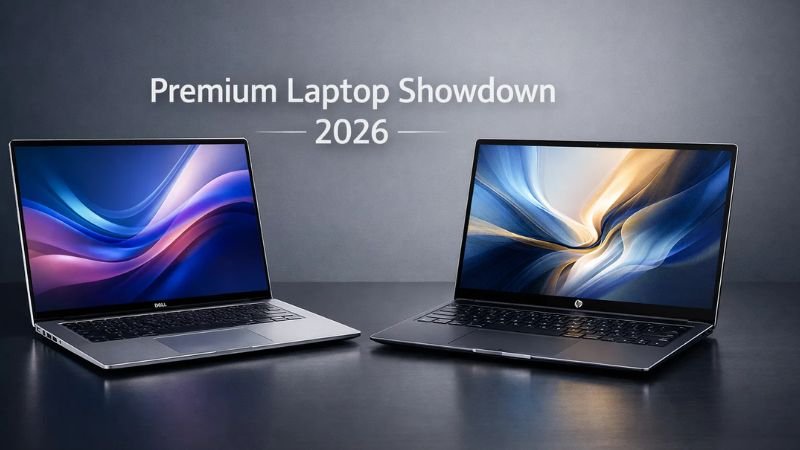
Dell XPS vs HP Spectre: The Premium Laptop Showdown
When budget is not the first conversation, it comes down to Dell XPS vs HP Spectre — and in 2026, both flagships are legitimately excellent. This is less a fight with a clear winner and more a choice between two different philosophies about what a premium laptop should be.
Dell XPS 15 and XPS 16
The XPS range has always been about disciplined refinement over gimmicks. The XPS 16 with Intel Core Ultra 9 pairs with an NVIDIA RTX 4070 — a discrete graphics card for laptops that handles 4K video editing, 3D rendering, and gaming laptop comparison benchmarks that embarrass machines costing similar money and marketing themselves as dedicated gaming laptops. The 3.5K OLED display option is among the best panels on any Windows laptop in 2026 — not just good for the price, objectively excellent by any measure.
Battery life sits at 14 to 16 hours on mixed workloads using the integrated GPU. Push the RTX 4070 hard on a sustained render, and that drops significantly — worth knowing before you rely on it through a long flight. Build quality is machined aluminium throughout, and the fit and finish is among the tightest in the Windows laptop 2026 market. Processor benchmark scores on the Core Ultra 9 put it at the top of the Intel laptop stack.
The XPS 13 is the companion story for portability-first buyers — a proper Copilot+ PC hitting 48 TOPS of AI NPU performance, weighing just over 1.2 kg. For a thin and light laptop with genuine AI-powered laptop features and all-day battery life, nothing in Dell’s lineup beats it.
HP Spectre x360 14 and 16 (OmniBook Ultra)
The Spectre x360 is HP making a deliberate statement. The 360-degree hinge is flawless — fold it into tent or tablet mode, and it holds position without wobble or creak. The OLED display in the 16-inch model is one of the best screens on any laptop currently available — vivid, sharp, wide colour gamut, and bright enough to use outdoors. The display quality comparison here is where the Spectre most convincingly outpoints the XPS: colour coverage, peak brightness ceiling, and panel uniformity are all slightly better.
The Snapdragon X Elite version delivers 15 to 17 hours of genuine battery life — the kind of number that makes you reconsider whether you need to pack a charger for day trips. NPU performance hits 45 TOPS for full Copilot+ certification, and all of Microsoft’s AI-powered laptop features work out of the box without any configuration. The 9MP webcam is genuinely impressive for video calls and content creation.
In the HP OmniBook vs Dell Pro conversation at the premium end, use case is everything. If you need raw processing headroom, a discrete GPU for creative or gaming work, or the biggest OLED panel available, the XPS 16 wins. If you want the best 2-in-1 on the market, exceptional battery life, and a display that stops people mid-sentence, the Spectre x360 takes it.
Dell XPS vs HP Spectre: Quick Comparison
| Spec | Dell XPS 16 (2026) | HP Spectre x360 16 (2026) |
| Processor | Intel Core Ultra 9 | Snapdragon X Elite / Core Ultra 7 |
| GPU | NVIDIA RTX 4070 (optional) | Integrated only |
| Display | 3.5K OLED, stunning | OLED, slightly better colour |
| Battery Life | 14 to 16 hours (iGPU) | 15 to 17 hours |
| Form Factor | Clamshell only | 2-in-1 convertible |
| AI NPU (TOPS) | 48 TOPS | 45 TOPS |
| Build | Machined aluminium | Premium aluminium |
| Best For | Performance, creative, gaming | Versatility, travel, design |
Bottom line: The answer to the question: Dell XPS vs HP Spectre, which is better? Choose Dell XPS if you need maximum laptop performance, a discrete GPU, or the biggest screen. Choose HP Spectre x360 if you want 2-in-1 flexibility, exceptional battery life, and arguably the best OLED display in the Windows laptop market.
AI Features in 2026: What Copilot+ PC Actually Means for You
The term Copilot+ PC gets thrown around constantly in 2026, but most buyers are not entirely sure what it means in practice. Here is the plain version: a Copilot+ PC is any laptop with an AI NPU delivering 40 TOPS or more. That NPU handles AI tasks locally — on the device — rather than sending data to a cloud server. The practical benefits are real, not theoretical.
Windows Recall, which lets you search everything you have ever seen on your screen using natural language, runs entirely on the NPU. Windows Studio Effects — background blur, eye contact correction, automatic framing during video calls — run on the NPU without affecting CPU performance or draining battery. Live captions with real-time translation across 40+ languages run on the NPU. These are features you will use every day if your work involves calls, content, or communication.
Both Dell and HP have Copilot+ certified machines across multiple price tiers in 2026. On the Intel Core Ultra side, both brands clear 40 to 48 TOPS depending on the chip tier. On the Snapdragon X Elite laptops side — the HP OmniBook Ultra and select Dell XPS 13 configurations — you get 45 TOPS alongside battery life that consistently outperforms Intel equivalents by three to four hours in real use.
For creative professionals specifically, the NPU performance (TOPS) number matters when you are running local AI tools for video upscaling, background generation, or voice isolation. Both brands are hovering at the 45 to 48 TOPS sweet spot for these workflows. Neither has a meaningful edge here — the software you use will matter more than which brand’s NPU is doing the work.
After-Sales Support and Reliability: The Part Nobody Talks About Enough
Here is the thing about laptops: the machine you buy today will probably need service within three years. A dead battery, a busted hinge, a keyboard key that stops registering — these are not exotic failures; they are routine. How a brand handles that moment matters more than almost any spec on the sheet. Here is the breakdown on Dell vs HP Laptops‘ Reliability & Support.
Dell’s after-sales service and support is the strongest in the Windows laptop segment, and it is not particularly close for business buyers. ProSupport offers on-site warranty coverage with next-business-day technician response, accidental damage protection, and customer support staff who are technically capable on higher tiers. In India, the service centre network covers Tier 1 and most Tier 2 cities meaningfully. Predictive failure alerts through SupportAssist catch issues before they become crises — the system monitors component health and flags problems proactively.
HP’s Care Pack warranty has genuinely improved. For consumer purchases, the gap between Dell and HP on after-sales support has narrowed. HP’s service response for the premium EliteBook and Spectre lines is prioritised, and the phone support has improved in technical depth. The gap is most visible for budget consumer lines (HP 15s, entry Pavilion) and in smaller cities, where service centre availability and response time can be inconsistent.
Build Quality and Longevity
For personal and student purchases, both brands provide an adequate 1-year standard warranty with extended options available at a reasonable cost. Buy the best warranty plan you can afford — that advice is boring, consistent, and correct. For business purchasing decisions: Dell ProSupport with on-site warranty is a genuinely superior product that IT managers depend on, not just a selling point. Reliability over three to five years, based on enterprise survey data, consistently puts Dell and HP’s business lines at the top of the segment, with Dell holding the edge on support infrastructure.
Dell vs HP: Which Laptop Should You Buy?
If you just want the quick answer for choosing Dell vs HP laptops, here’s the simple way to decide.
Choose Dell if:
- You want the best premium ultrabooks, like the XPS series
- You prefer business-focused reliability with the Latitude lineup
- Gaming performance matters, and you’re considering Alienware
- You like minimal, professional laptop designs
Choose HP if:
- You want stylish premium laptops like the Spectre series
- You need a strong balance between price and features
- You prefer HP’s business machines, like the EliteBook
- You like brighter displays and more design variety
The bottom line:
Dell usually wins for premium build quality and professional laptops, while HP often offers better style, variety, and value across different price ranges.
Dell vs HP Laptops Quick Comparison
| Category | Dell | HP |
| Best for Students | Inspiron series | Pavilion series |
| Best for Business | Latitude series | EliteBook series |
| Best for Gaming | Alienware | Omen |
| Best for Premium Ultrabooks | XPS | Spectre |
| Best Budget Options | Inspiron 3000 | HP Laptop 15 series |
| Battery Life | Excellent on XPS & Latitude | Strong on Spectre & EliteBook |
| Design & Build | Minimal, professional | Stylish, modern |
| Customer Support | Reliable enterprise support | Strong global support |
Dell vs HP Laptops Which Is Better: The Honest Verdict
After going through every segment, a clear pattern emerges, even if there is no universal winner in the Dell vs HP laptops debate.
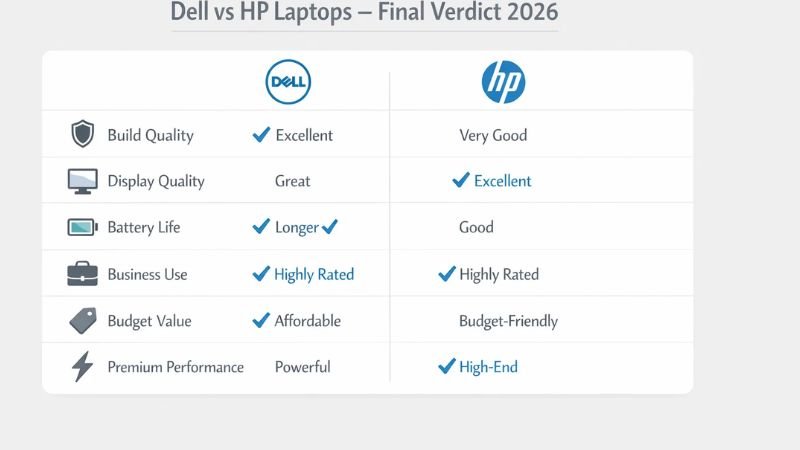
Dell consistently wins on build quality and durability, after-sales support infrastructure, and raw performance at the premium end. The Latitude is the best business laptop for large enterprise deployments. The XPS is the best premium laptop for professionals who push their hardware. The Inspiron is the most reliable everyday laptop at its price.
HP consistently wins on display quality per rupee spent, design creativity, and versatility through its 2-in-1 lineup. The OmniBook Ultra is the best thin and light Snapdragon X Elite laptop for battery-obsessed travellers. The Spectre x360 is the best 2-in-1 on the Windows market. The Pavilion offers a better everyday display and keyboard at the budget end. So, if you are finding Dell vs HP Laptops: Which is better, the clear answer is:
- Choose Dell if: long-term reliability, strong after-sales support, a build that holds up over the years, or a business buying decision at scale are your priorities.
- Choose HP if: display quality per rupee, a more design-forward machine, 2-in-1 flexibility, or the best battery life from a Snapdragon X Elite configuration matter more.
The genuinely good news is that in 2026, both brands build excellent laptops. Copilot+ PC certification, Intel Core Ultra chips, and Snapdragon X Elite performance have raised the floor across both lineups significantly. Pick the one that fits your use case, check the after-sales support options in your city, and stop overthinking it.
One last thing: whichever brand you choose, buy the best warranty you can afford. It is the most boring advice in tech. It is consistently the most correct one.
Dell vs HP Laptops: Frequently Asked Questions
Dell is generally better for build quality, long-term durability, and after-sales support — especially for business buyers. HP is generally better for display quality per rupee, design, and 2-in-1 versatility. Neither brand is universally superior; the better choice depends on your specific use case and budget.
Dell’s XPS and Latitude series are consistently rated for longer lifespan in enterprise surveys, largely due to premium build materials and predictable driver support. HP’s EliteBook and Spectre lines are also built for longevity. For budget models, Dell Inspiron typically holds up better physically over a three-to-four year ownership period than comparable HP Pavilion models.
For most students in India, both are strong choices for the best budget laptops. Under Rs. 60,000, the Dell Inspiron 14 offers better durability and support, while the HP Pavilion Plus 14 offers a better display and keyboard. For students who prioritise portability and battery life at a higher budget, the HP OmniBook Ultra on Snapdragon X Elite is the strongest option available in 2026.
Dell has consistently better customer service, particularly for business buyers. Dell ProSupport offers on-site warranty with next-business-day technician response and technically capable support staff at higher tiers. HP Care Pack is solid and has improved, but Dell’s service network — especially in India — is more extensive and reliable across both Tier 1 and Tier 2 cities.
Neither Dell nor HP is primarily known as a gaming laptop brand, but both offer capable options in the premium segment. The Dell XPS 16 with an NVIDIA RTX 4070 is the stronger gaming and gaming laptop comparison pick from either brand — it handles demanding titles and creative workloads without requiring a separate gaming machine. HP’s OmniBook Ultra uses an integrated GPU only and is not aimed at gaming use cases.
Yes, especially the EliteBook series. HP EliteBook laptops include Wolf Security hardware protection, Sure Start BIOS self-healing, and Sure View privacy screens that make them among the most security-hardened business laptops available. For small businesses and individual professionals in data-sensitive roles, the EliteBook is the best laptop for business. For large fleet deployments, Dell Latitude edges it in manageability and support infrastructure.
Both brands offer Copilot+ PC certified laptops in 2026, meaning they include an AI NPU delivering 40 TOPS or more. Dell’s Copilot+ lineup includes the XPS 13, Inspiron Plus, and Latitude series using Intel Core Ultra with up to 48 TOPS. HP’s lineup includes the OmniBook Ultra on Snapdragon X Elite (45 TOPS) and EliteBook G11 models. The Snapdragon X Elite laptops from HP offer superior battery life; the Intel Core Ultra models from Dell offer broader app compatibility with legacy Windows software.