Common Cyber Attacks Targeting Dutch Users and How to Avoid Them!
- Software
 Editorial Team
- 0
- 23 minutes read
The Netherlands remains one of the most digitally connected hubs in the world. From the high-speed hubs in Amsterdam to the smart-farming initiatives in Brabant, our lives are lived online. But this convenience comes with a target. In 2026, the phrase cybersecurity Netherlands isn’t just a corporate buzzword; it’s a daily necessity for every citizen.
As cybercriminals leverage AI to bypass traditional defenses, the variety of common cyber attacks has shifted. We are no longer just dealing with clunky emails full of typos; we are facing “industrialized” fraud. Whether you are using Tikkie for a quick payment or logging into DigiD, understanding the risks and practicing proactive cyber hygiene is your best defense.
The State of Cybersecurity in the Netherlands (2026)
Currently, the Netherlands ranks as a top target for digital fraud in the EEA (European Economic Area). This isn’t because the banks are weak, but it’s because the digital economy is so vast. The Dutch National Cyber Security Centre (NCSC) has highlighted that while network security at an infrastructure level is strong, the “human layer” is where most common cyber attacks succeed.
With the implementation of the Dutch Cybersecurity Act (the local version of NIS2), companies are tightening their information security. However, individual users often remain the “weakest link.” Let’s look at the common cyber attacks knocking on Dutch digital doors this year.
Top Common Cyber Attacks Targeting Dutch Users in 2026
With the new Dutch Cybersecurity Act forcing companies to tighten up, but here’s the reality most cyber attacks still happen because someone clicked the wrong link or trusted the wrong message.
1. The Sophistication of Phishing Attacks in NL
If we look at common cyber attacks today, phishing remains the undisputed king. However, the 2026 version of a phishing attack is far more dangerous than those of a few years ago.
AI-Driven Localization
In the past, you could spot a scam by its poor Dutch grammar. Today, LLMs (Large Language Models) allow scammers to generate flawless Dutch text that mimics the exact tone of the Belastingdienst (Tax Authorities) or Rijkswaterstaat. These email phishing attacks often look indistinguishable from official correspondence.
The Rise of “Quishing” and Smishing
In the Netherlands, smishing attacks (SMS-based phishing) often target our reliance on mobile banking. You might receive a text saying your “Bank-pas” is expiring or that a package from PostNL requires a small customs fee. A newer trend is “Quishing”—malicious QR codes placed in public spaces or sent via mail that lead to fake login portals.
How to Prevent Phishing Attacks:
- Trust but Verify: Never click a link in an unexpected text or email. Instead, go directly to the official website by typing it in your browser.
- Check the URL: Scammers often use “look-alike” domains (e.g., ing-beveiliging.nl instead of ing.nl).
- Use Tools: Advanced antivirus software like Kaspersky Internet Security now includes real-time link scanning that blocks these sites before they load.
2. Ransomware Attacks: Protecting Your Digital Life
While we often hear about ransomware attacks used to target big hospitals or government offices, now they’re going after regular people and small businesses. Ransomware protection is no longer just for IT professionals.
How Ransomware Works in 2026?
Modern ransomware doesn’t just lock your computer; it often employs “double extortion.” The hackers steal your sensitive files—private photos, tax documents, or scans of your ID—and threaten to publish them on the dark web unless you pay. This is a massive hit to your digital privacy.
Why Personal Data Protection Matters?
In the Netherlands, we value our privacy (the AVG or GDPR is strictly enforced). A successful ransomware hit can lead to identity theft, where your personal details are used to take out loans or commit further online scams.
Preventing the Lockout:
- Offline Backups: Keep your most important data on a drive that isn’t always connected to your computer.
- Behavioral Detection: Use software that watches behavior, not just virus signatures. Traditional antivirus looks for known cyber attacks. You need threat detection that looks for actions. Kaspersky ransomware protection uses “System Watcher” technology to detect if a program is trying to encrypt files and stops it instantly.
Use software that watches behavior, not just virus signatures. Traditional antivirus software looks for known threats. But new ransomware variants appear daily. You need something that notices when a program suddenly starts encrypting hundreds of files and shuts it down immediately.
3. Online Scams: The “Family-in-Need” and Tikkie Fraud
The Dutch love for efficiency has been weaponized by criminals. Online scams involving WhatsApp and Tikkie have become a national epidemic.
WhatsApp Impersonation
A scammer sends a message: “Hi Mom, I have a new number. My phone broke, and I need to pay a bill urgently.” Because it’s in Dutch and sounds plausible, many fall for it. This is a form of social engineering that bypasses even the best network security because the user willingly sends the money.
Marketplace (Marktplaats) Deception
When selling an item, a “buyer” might ask you to pay €0.01 via a link to “verify your identity.” This link leads to a fake banking portal. Once you enter your details, the scammer has full access to your account. This highlights why safe online transactions are important.
Online Fraud Prevention:
- Voice Verification: If a “family member” asks for money, call them on their old number or ask any question only they would know.
- Use Official Platforms: Only use the built-in payment systems on Marktplaats rather than external links.
The Importance of Identity Theft Protection
As we move more of our lives to the cloud, personal data protection becomes harder to manage. Information security is about more than just a password; it’s about your entire digital footprint.
If a hacker gains access to your DigiD, they can change your tax info or redirect government benefits. This is why identity theft protection is a core pillar of modern cybersecurity for individuals.
Password Security Tips
- Length over Complexity: A long passphrase like I-Love-Stroopwafels-In-The-Rain! is harder to crack than P@ssw0rd!.
- Unique Credentials: Never reuse a password. If your favorite Dutch webshop gets hacked, you don’t want that same password giving the hacker access to your primary email.
- Use a Password Manager: Utilizing a dedicated password manager allows you to have hundreds of unique, 20-character passwords without needing to remember them.
Improving Your Cyber Hygiene
Think of cyber hygiene like brushing your teeth; it’s a daily set of small habits that prevent major problems later.
Multi-Factor Authentication (MFA)
If you aren’t using multi factor authentication, you are leaving your digital door unlocked. Even if a hacker has your password, they can’t get in without that second code. In 2026, many Dutch services will now mandate MFA, but you should enable it on every social media and shopping account you own.
Secure Browsing Habits
Using a VPN isn’t just for hiding your location. VPN protection is essential when you are using public Wi-Fi at a train station or café. It prevents “Man-in-the-Middle” attacks where a hacker intercepts your data in transit. For secure browsing, always look for the “HTTPS” lock, but remember—scammers can have locks too!
Software Updates
Every time you hit “Remind me later” on a software update, you are giving hackers a window of opportunity. Data breach prevention relies heavily on patching “vulnerabilities” that hackers use to enter your system.
Why Kaspersky Antivirus is the Right Choice for Dutch Users?
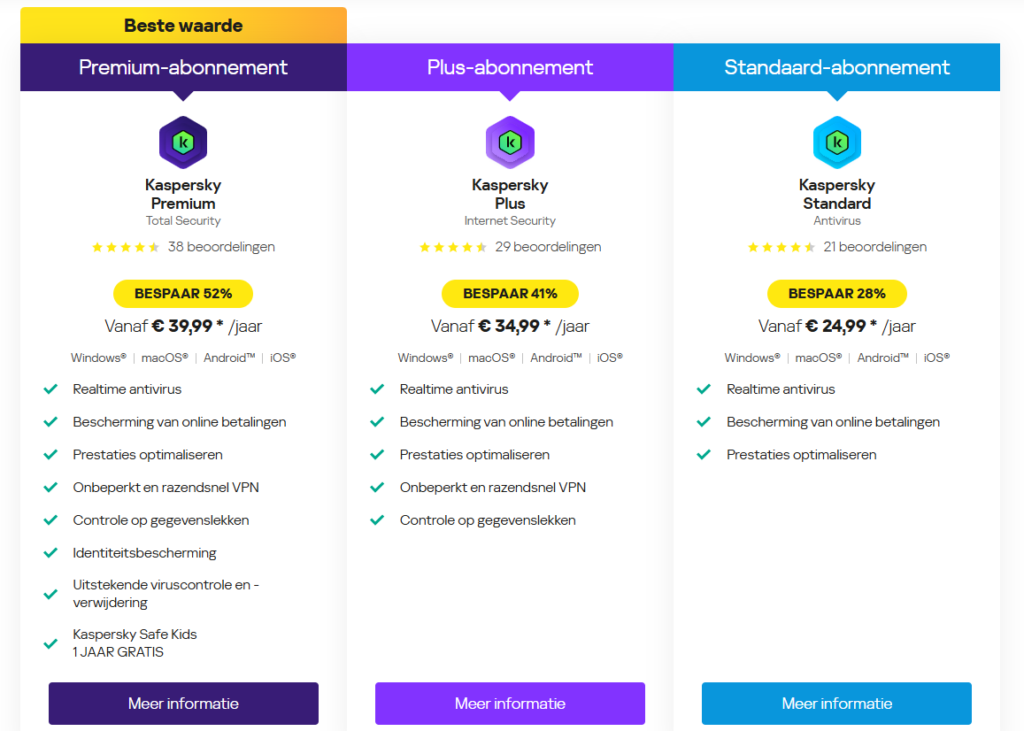
When choosing the best antivirus software, you want a partner that understands the common cyber attacks of the region. Kaspersky cybersecurity tools are built with the modern Dutch lifestyle in mind.
Kaspersky Safe Money
Whether you are using iDEAL or credit cards, the Safe Money feature opens your bank’s website in a dedicated, hardened browser. This ensures safe online transactions and protects against “keyloggers” that try to record your keystrokes.
Advanced Malware Protection
Kaspersky malware protection doesn’t just wait for a virus to appear. It uses advanced threat detection to scan for “malware-free” attacks, like those that use legitimate system tools to steal data. This is the foundation of endpoint security for your home devices.
Privacy Tools
With digital privacy at risk, features like “Webcam Protection” and “Account Check” (which notifies you if your email has been leaked) are invaluable. If your data is found in a breach, Kaspersky provides a roadmap for data breach protection.
Conclusion: Staying One Step Ahead
The digital world in the Netherlands is vibrant and full of opportunity, but it requires a new level of awareness. By understanding how common cyber attacks like phishing and ransomware work, and by maintaining a high standard of cyber hygiene, you can protect your family and your finances.
You don’t have to be a tech expert to have world-class cybersecurity Netherlands. By combining common-sense habits with powerful tools like Kaspersky Internet Security, you can browse, shop, and socialize with confidence.
Key Takeaways Checklist:
- Antivirus: Ensure you have Kaspersky malware protection active and updated.
- Passwords: Use a password manager and enable multi factor authentication.
- Awareness: Stay skeptical of “urgent” messages on WhatsApp or SMS.
- Privacy: Use VPN protection on public networks to ensure secure browsing.
Frequently Asked Questions
What’s the #1 cyber attack hitting Dutch users right now?
Phishing. But it’s evolved, scammers use AI to write perfect Dutch that sounds exactly like the Belastingdienst or your bank. We’re seeing tons of smishing (SMS scams) targeting mobile banking and squishing (QR code scams) on parking meters. The WhatsApp “family in need” scam has gotten so bad that the NCSC issued warnings. These common cyber attacks work because they exploit trust. Best defense? Verify before you click or send money.
How can I tell if a message is actually from my bank?
Assume every message is fake until proven otherwise. Banks never ask you to click a link and enter credentials. If you get a message about your account, ignore it. Open your browser, type the bank’s website yourself, and log in. Real problems will show there. Check sender addresses, scammers use “ing-service.nl” instead of “ing.nl”. Urgency is always a red flag.
Is free antivirus actually good enough?
Free options like Windows Defender catch known viruses but struggle with new threats. Paid programs (€30-50/year) offer behavioral detection, secure browsers for banking, VPNs, and password managers. For online banking and sensitive documents, it’s worth it. But free antivirus beats no antivirus.
What would I do if I clicked a phishing link?
Move fast. If you entered banking info, call your bank’s fraud line immediately. Change passwords, starting with email. Turn on two-factor authentication. Report to fraudehelpdesk.nl and file a police report at politie.nl. Watch accounts closely for a month. These scams fool professionals.
How do I protect myself from ransomware?
Keep offline backups on an external drive you disconnect after using. Use security software with behavioral detection. Be paranoid about email attachments. Update software immediately. Don’t use admin accounts for daily browsing. If hit, don’t pay, contact NCSC and the police instead.
Why is the Netherlands such a big target?
The Netherlands is one of the world’s most advanced digital economies. Nearly everyone uses online banking, shops online constantly, and makes digital transactions. Tools like Tikkie and iDEAL create convenience but also scam opportunities. The country is wealthy with valuable data. Criminals follow money. The systems are solid, but human trust is the weak link. That’s why awareness matters.
Last Updated on: March 30, 2026